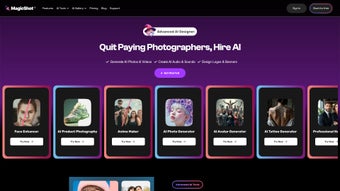

Download MagicShot – AI‑Powered Design Tool for Web Apps
Overview of MagicShot
MagicShot is a cloud‑native, subscription‑based design platform that leverages artificial‑intelligence to turn simple text prompts into polished visual assets. Launched on Softonic in April 2025, the service targets marketers, freelance designers, and development teams that need fast, high‑quality graphics without the overhead of traditional desktop software. Because the application runs entirely in a web browser, it is truly cross‑platform: Windows 10/11, macOS 12+, popular Linux distributions, and mobile operating systems such as Android 9+ and iOS 13+ are all supported.
Users simply open a modern browser—Chrome, Edge, Firefox, Safari, or Opera—and sign in, eliminating the need for installations, license keys, or regular patch cycles. The platform’s AI engine analyses brief textual inputs, suggests layout structures, recommends color palettes, and even checks brand compliance automatically. All assets are stored in encrypted cloud storage that complies with GDPR and CCPA, and communications are secured with HTTPS.
Regular server‑side updates ensure that every user benefits from the latest machine‑learning models without any manual intervention. While a free 14‑day trial provides full access to the feature set, continued usage requires a paid subscription, which is offered in tiered plans that scale from solo freelancers to enterprise‑wide deployments. In short, MagicShot promises a secure, always‑up‑to‑date, browser‑based workflow that removes the friction of installing heavyweight design tools while delivering AI‑driven speed and consistency.
Feature Deep Dive & What Sets MagicShot Apart
Core Feature List
- AI‑Generated Layouts – Instant mock‑ups based on brief textual inputs.
- Smart Color Palettes – Automatic harmony suggestions powered by machine learning.
- Responsive Asset Export – One‑click download of PNG, SVG, or PDF optimized for web, print, and mobile.
- Collaboration Hub – Real‑time comments, version history, and role‑based permissions.
- Template Library – Thousands of pre‑built designs for landing pages, social posts, and email banners.
- Brand Guard – AI checks to ensure brand guidelines (fonts, colors, logos) are respected.
- API Access – Integrate MagicShot generation into your own workflow tools.
- Continuous Learning – The AI improves with each project, offering more relevant suggestions over time.
Pros
- Runs in any modern browser – no installation required.
- AI reduces design time by up to 70 % for routine assets.
- Secure cloud storage with end‑to‑end encryption.
- Automatic updates keep features fresh without user effort.
- Scalable subscription plans for freelancers to enterprises.
- Real‑time collaboration eliminates version‑control headaches.
- Extensive template library accelerates first‑draft creation.
Cons
- Requires an active internet connection; offline work is not supported.
- Subscription cost may be higher than a one‑time desktop license for occasional users.
- Learning curve for the AI prompt syntax.
- Limited export formats compared to some premium desktop suites.
- Performance can vary on older browsers or low‑end devices.
The combination of AI‑driven generation, cloud‑based collaboration, and a rich template ecosystem makes MagicShot a compelling alternative to legacy design tools. Teams that prioritize speed, brand consistency, and the ability to work from any device will find the subscription model a worthwhile investment, while occasional hobbyists might prefer a traditional offline editor due to the lack of an offline mode.
Installation, Usage & Compatibility Guide
Getting Started – No Download Required
Because MagicShot is a SaaS solution, the “installation” process consists of creating an account and logging in through a supported browser. Visit the official MagicShot landing page, click the “Start Free Trial” button, and complete the registration form. After confirming your email address, you are redirected to a clean dashboard where the interface loads instantly. The entire experience is secured by HTTPS, and no local files are written to the user’s machine, which reduces the attack surface and simplifies IT management.
Step‑by‑Step Workflow
- Create a New Project: Choose a template category (social media, landing page, email banner) and type a concise brief describing the desired outcome.
- AI Prompt: The engine parses the text, generates several layout concepts, and presents them as selectable thumbnails.
- Customize: Use drag‑and‑drop components, edit typography, replace placeholder images, and fine‑tune colors with the Smart Palette.
- Collaborate: Invite teammates via email, assign viewer/editor roles, and leave inline comments that update in real time.
- Export & Share: Click “Export,” select PNG, SVG, or PDF, and download the asset. You can also generate a shareable link that provides read‑only access to the cloud‑stored version.
System Requirements & Operating System Support
MagicShot works flawlessly on Windows 10/11, macOS 12 or later, most modern Linux distributions, and mobile platforms (Android 9+ and iOS 13+). The application is optimized for Chrome, Edge, Firefox, Safari, and Opera. For the best experience, enable hardware acceleration in your browser settings and keep the browser updated to the latest stable release. Because the platform relies heavily on JavaScript and WebGL, older browsers such as Internet Explorer 11 may load the basic UI but will miss advanced AI rendering features.
All heavy processing—AI inference, asset rendering, and storage—is performed on MagicShot’s backend servers. This means even modest laptops, Chromebooks, or tablets can generate high‑resolution designs without noticeable lag, provided the internet connection is stable and has at least 5 Mbps bandwidth. Users are encouraged to clear browser cache periodically to ensure the newest AI model updates are applied and to avoid stale asset thumbnails.
Conclusion, FAQ & Call to Action
MagicShot delivers a modern, AI‑enhanced design workflow that eliminates the need for bulky desktop software while keeping the collaborative power teams demand. Its browser‑only architecture means you can download final assets instantly, stay secure with encrypted cloud storage, and enjoy seamless updates without manual patches. Whether you’re a freelance designer looking for a fast way to produce client‑ready graphics or a large marketing department that needs to scale creative output, MagicShot’s subscription model offers predictable costs and continuous feature improvements.
Frequently Asked Questions
Is there a free version of MagicShot?
MagicShot offers a 14‑day free trial that gives full access to all features. After the trial, you must choose a paid subscription to continue using the service.
Can I use MagicShot offline?
No. Because the AI engine and asset storage are cloud‑based, an active internet connection is required for all operations, including design generation and export.
What browsers are officially supported?
MagicShot supports the latest versions of Chrome, Edge, Firefox, Safari, and Opera. While it still loads in Internet Explorer, some advanced features may be limited.
How secure is my data on MagicShot?
All data is transmitted over HTTPS and stored encrypted at rest. MagicShot complies with GDPR and CCPA, and offers two‑factor authentication for added account protection.
Can I integrate MagicShot with other tools?
Yes. MagicShot provides an API that lets you trigger design generation from external platforms such as CMSs, marketing automation tools, or custom scripts.
Ready to accelerate your design process? Start your free trial today, explore the AI‑driven templates, and see how much time you can save. After using MagicShot, consider leaving a review on Softonic – your feedback helps the community make informed decisions.
MagicShot impresses with its intuitive AI interface and robust collaboration tools. The only downside is the lack of offline mode, but for cloud‑first teams the trade‑off is worth it.



.png)



